
Every unit you service should call you back
When the walk-in goes warm at 6am, the store manager calls whoever they find first. A ProTag sticker on the unit makes sure that is you: they scan it, see your company, and reach your dispatch in one tap. Your techs scan the same sticker for the full service history.
Plans start at $499 a year. Nothing for your customer to install.
You did the install. Someone else got the service call.
Your best work is sitting on rooftops and in back rooms with nothing on it that says who to call. When it breaks, the customer starts from scratch, and you are one result among many.
The 6am search
The cooler is warm and the manager does not remember who put it in. They search "refrigeration repair near me" and call whoever answers.
The new manager
Your contact moves on. Their replacement inherits the building but not the phone list, and the relationship walks out the door with the old one.
The faded card
The business card taped to the panel door, the marker on the disconnect. Gone by the second summer, and never in front of the person deciding who to call.
One sticker. Two jobs.
For your customer, it is the fastest way to reach you. For your techs, it is the service record. The second job is why the first one keeps working: a sticker your techs scan every visit is a sticker that stays on the unit and stays current.
Every screenshot below is the real product, not a mockup.
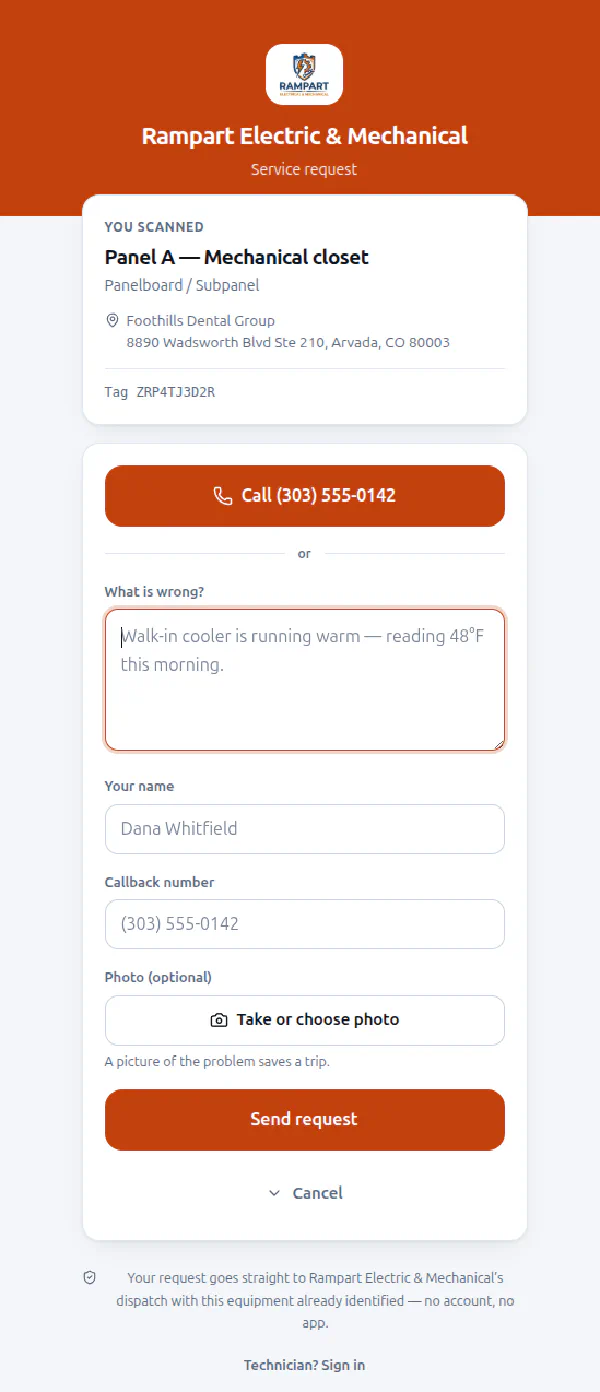
Your company, one tap away, on the unit that just broke
Your company name, your logo, your brand color, your dispatch number. One tap to call, or a short form that already knows which equipment it is and where it sits. No account, no app, no search results, no competitor's ad in between.
- Your branding on the page, not ours
- Request lands with equipment and address already attached
- Photo of the problem, straight from their camera
The history only you have
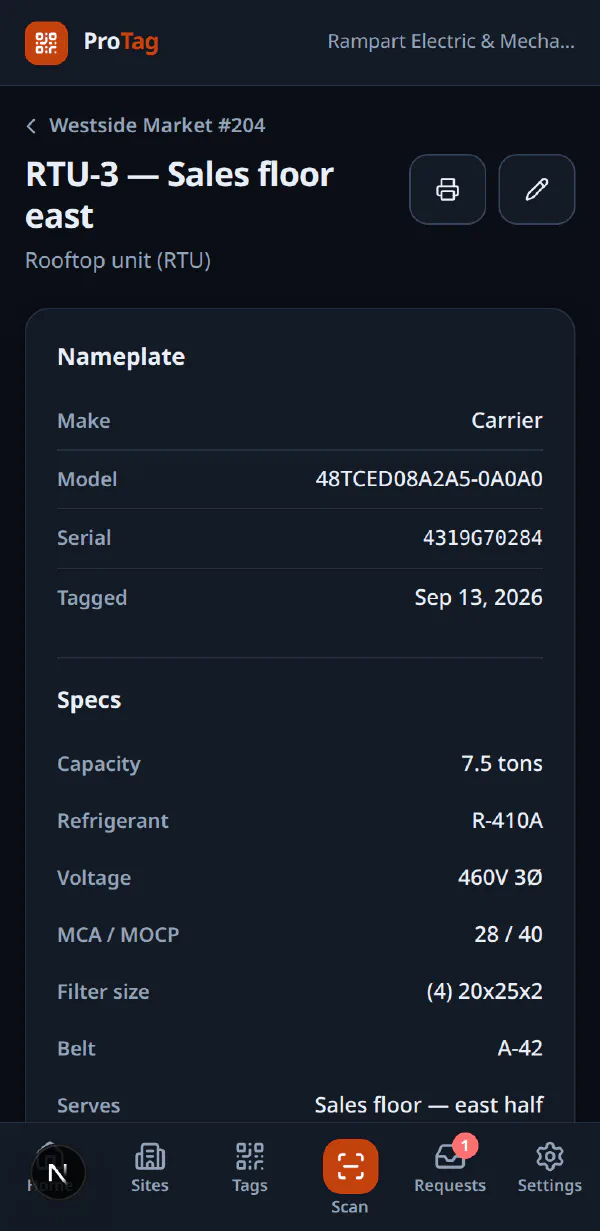
Same sticker, signed-in session. Nameplate, specs, every logged visit with photos, and what this unit is fed from. Years of it, on your account. That is a reason to call you that no other contractor can match.
- What the last tech found, in their words
- Model, serial, refrigerant, filter and belt sizes
- Fed from and feeds, so you know what goes dark
Tag the whole room, not just the unit you came for
Every sticker is a future call. You are already standing in the mechanical room, so tag the panel, the rack, the water heater and the RTU on the way out. It takes seconds each, and from then on every one of them points back to you.
Blank tags, set up on the spot
You do not have to know what a sticker goes on before you print it. Keep blank tags in the van, stick one on, scan it, and fill in the equipment right there.
- Print your own on two inch square label stock, twelve to a US Letter sheet, with your company name and number on every label
- Or order printed weatherproof tags that scan straight to your branded page
- A human readable tag ID under the code, for when the sticker is scratched or greasy
Records that make the next visit faster
Pick a category and the right spec fields appear. Record what feeds what while you are tagging, and any tech scanning the walk-in can walk the chain up to the main breaker without a drawing or a call to the office.
- Reassign a tag when a condenser gets replaced
- Retire a tag when the sticker is destroyed, so scans stop resolving
- No drafting, no site survey, no separate diagramming tool
Tagged this morning, working for you for years
Add the site
Address, site contact, and the notes that matter: where the panel room key hangs, which door the alarm is on.
Tag the equipment
Stick a label on each unit and scan it. Name, category, nameplate. The right spec fields appear for the category.
Log every visit
Readings, parts, photos. The history builds on your account, visit by visit, and the next tech reads it before they get out of the truck.
The next call comes to you
When something breaks, whoever is standing in front of it scans the sticker and reaches your dispatch, not a search engine.
When they call, you already know which unit
Requests from a scan arrive with the equipment, the site and a callback number already on them, so dispatch starts with the answer instead of twenty questions. Work them in ProTag alongside whatever you already dispatch from.
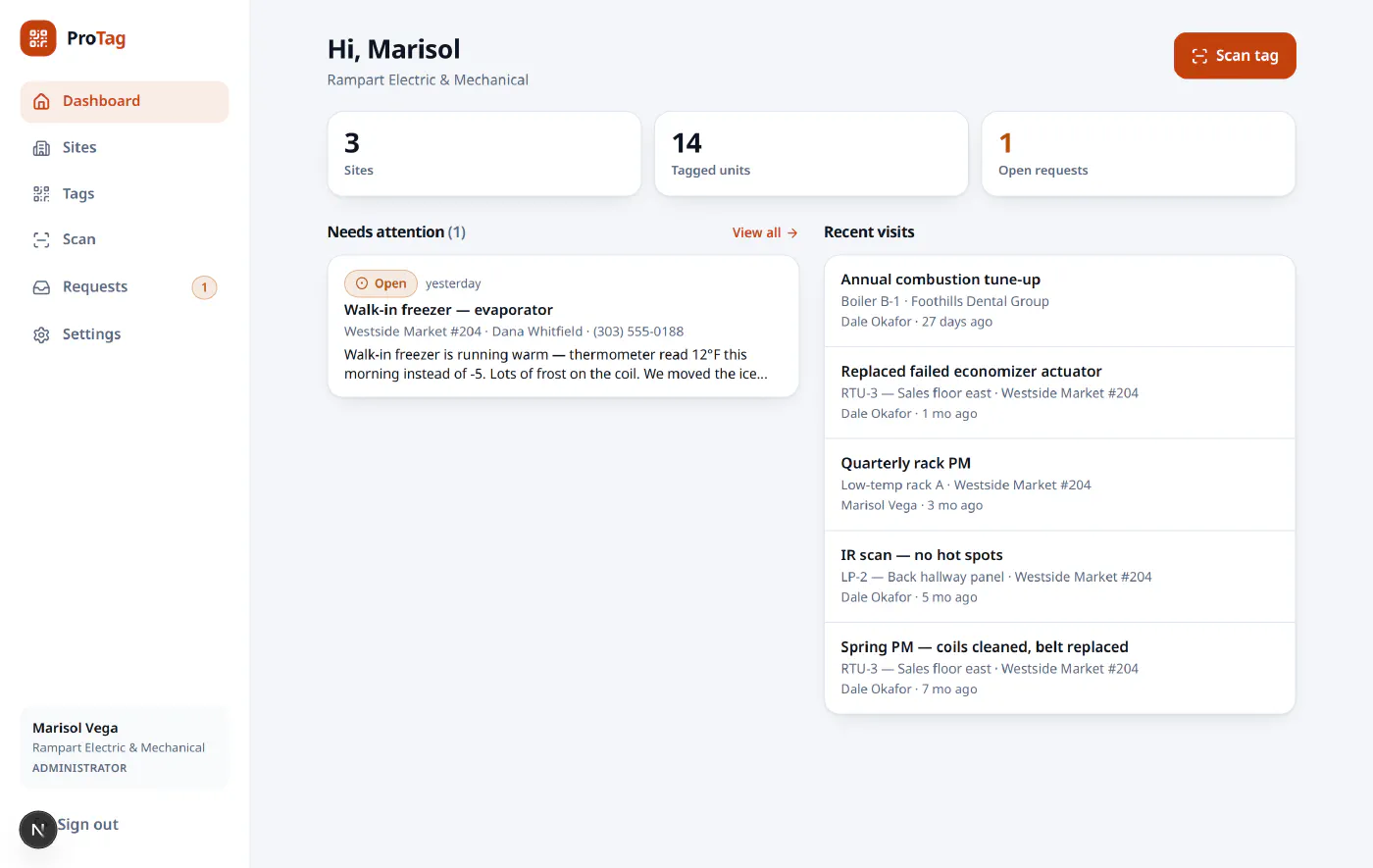
A real dispatch view, with demo data in it.
Straight answers
Do my customers need an app?
No. The camera app on any modern phone reads the code and opens a web page with your name on it. There is nothing to install and no account to create.
Can a competitor scan our tags and see our work?
No. Anyone scanning without a signed-in account sees only your branded service request page. Specs, service history and the feed chain require an account on your company's ProTag.
Does this replace our dispatch software?
No. ProTag is the sticker and the equipment record. Requests show up in ProTag, and on Pro and up they are emailed to your dispatch address too, so they reach the office wherever you already work.
Will the stickers survive a rooftop?
Print on outdoor rated vinyl or polyester label stock and they hold up to weather, wash-down and UV. The tag ID is also printed in plain text underneath, so a damaged sticker can still be keyed in by hand.
What happens when we replace a unit?
Move the tag to the new equipment in two taps, or retire it and put a fresh one on. The old unit keeps its service history either way.
How do techs log in with gloves on?
They do not type anything. Techs sign in with a passkey: their face, their fingerprint, or whatever already unlocks the phone. Every phone is tied to a named person, so each visit in the service history carries the name of whoever actually did the work.
Tag your first site today
Create your account, print your first tags, and stick one on real equipment in the next ten minutes.